 CyberGuard VPN
An encrypted tunnel for your connection
CyberGuard VPN routes your internet traffic through an encrypted VPN tunnel, so the websites you open see the address of our server instead of yours. One tap to connect, one tap to stop.
Free to download. Optional subscription unlocks the VPN connection.
Connecting Time
How it works
The app installs a VPN configuration through the system settings of your device. Once it is active, your traffic leaves the device inside an encrypted tunnel and exits from the server location you picked.
Allow the VPN configuration
On the first connection iOS asks for permission to add a VPN configuration. This is the standard system dialog, and the profile can be removed at any time in Settings.
Pick a location
Choose a server from the list in the app. If you have no preference, the app connects to the location that responds fastest at that moment.
Connect
Tap the button once. While the tunnel is active, sites and services you open see the IP address of the VPN server instead of the address assigned by your network.
What the app does, and what it does not do
CyberGuard VPN is a VPN client and nothing more. We would rather be plain about the limits than let you expect something the app cannot deliver.
What it does
- Encrypts the traffic between your device and our VPN server.
- Replaces your IP address with the address of the server you connected to.
- Works on mobile data and on Wi-Fi networks, including public ones.
- Lets you choose among the server locations listed in the app.
- Runs without an account: there is no sign-up, no password, no profile.
What it does not do
- It does not scan your device, and it does not detect viruses or malware.
- It does not monitor battery health, storage or system performance.
- It does not make you anonymous. A VPN changes the route of your traffic, it does not erase the accounts you sign in to or the data sites collect about you.
- It does not block ads or trackers inside apps and web pages.
- It does not replace keeping your device and your apps up to date.
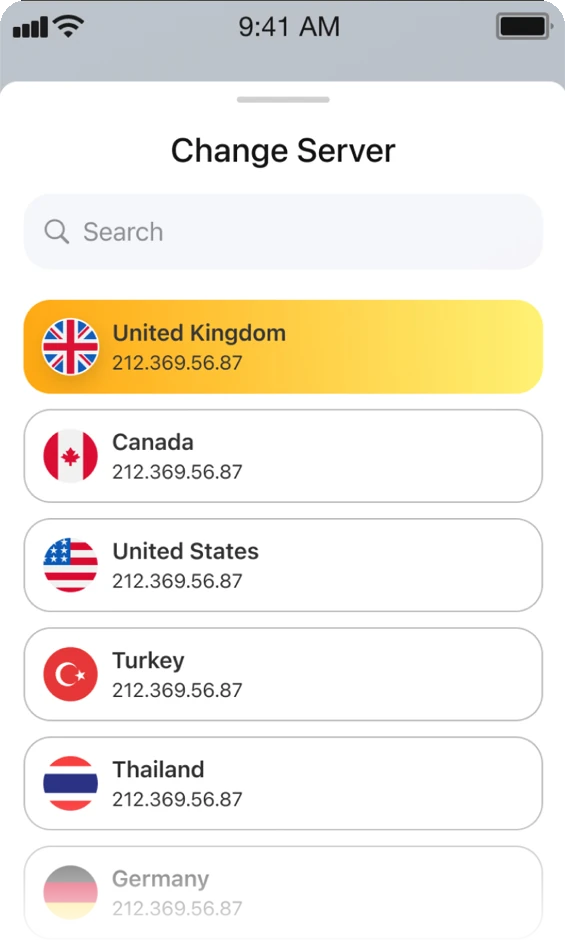
Choosing where to connect
The locations we run are listed in the app with a search field, so you can find one by name instead of scrolling. Picking a different location closes the current tunnel and opens a new one, and it takes a single tap.
Which locations are available changes over time as we add and retire capacity, so the list in the app is always the current one.
- No account and no sign-in before you can pick a location.
- Switch as often as you like while the subscription is active.
- Connection speed depends on distance and on your own network, so a location near you usually feels better than a far one.
Subscriptions
The app is free to download. Connecting through our servers requires an active subscription, purchased inside the app through your Apple Account.
| Plan | Billing | Renewal |
|---|---|---|
| Weekly | Charged once per week | Renews automatically until cancelled |
| Monthly | Charged once per month | Renews automatically until cancelled |
| Yearly | Charged once per year | Renews automatically until cancelled |
The exact price of each plan, in your local currency, and the length of any introductory offer are shown on the purchase screen in the app before you confirm. Payment is charged to your Apple Account at confirmation.
A subscription renews automatically unless you turn off renewal at least 24 hours before the current period ends. You manage and cancel it in Settings → your name → Subscriptions on your device, not in the app. Full conditions are in the Terms of Use.
Support
Questions about a connection, a subscription or your data go to the same place. Write to us and we answer by email.
If your message is about a purchase, tell us which plan you bought and roughly when. We have no access to your payment details, so the more context you give, the less back and forth it takes.
Email us support@sun-vpn.onlineRefunds for App Store purchases are decided by Apple, not by us, so a refund request goes through the Apple Account you bought with. More answers are on the support page.